Guide to Digital Transformation for Healthcare SMBs
Audit workflows, center the EHR, secure compliance, and roll out phased automation to cut admin work and improve revenue for healthcare SMBs.
 Samson JagorasPrincipal & CEO/CIOJune 27, 2026
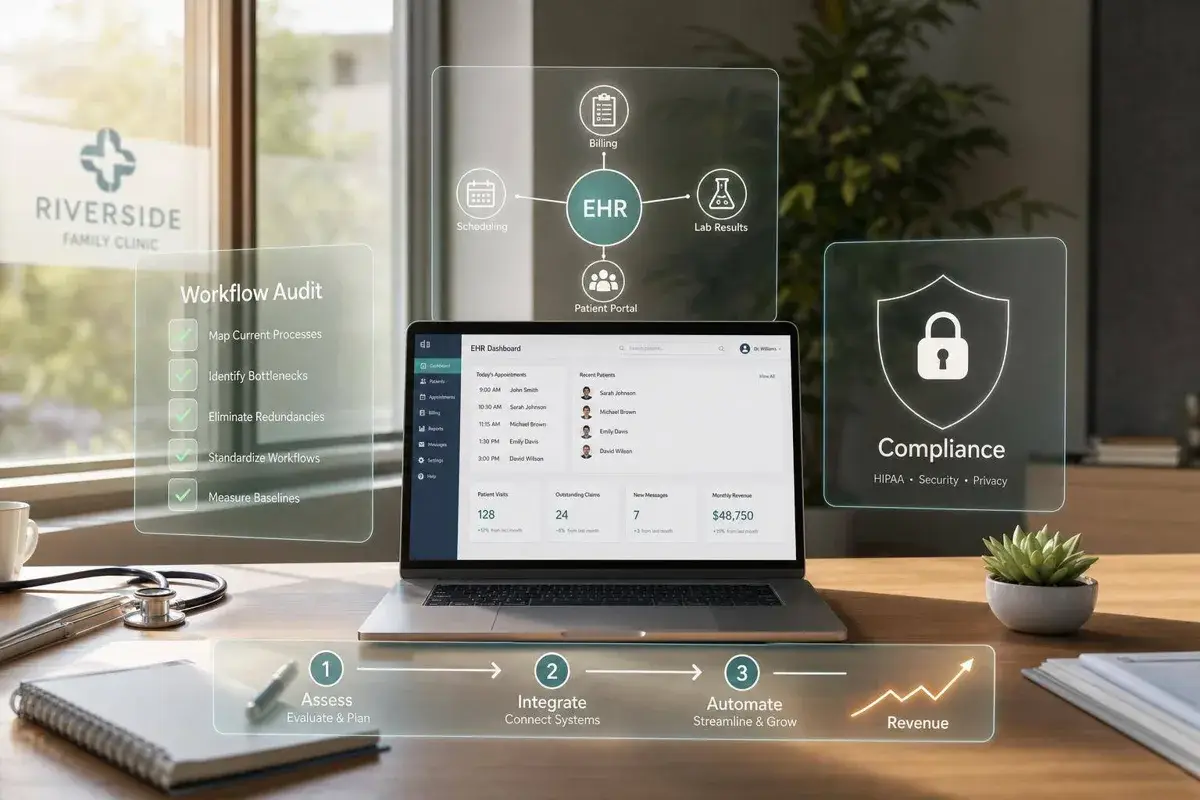
If your practice still relies on manual check-in, paper-heavy intake, and disconnected software, you’re paying for it in staff time, claim issues, and missed visits. I’d boil this guide down to a simple plan: audit the workflow first, fix the core systems next, roll changes out in stages, and track results with a short list of numbers.
Here’s the short version of what matters most:
- Map the full patient journey, from scheduling to checkout, to find duplicate work, paper use, and data gaps.
- Set clear targets like cutting check-in time, reducing charting time by 15% to 25%, or lowering no-shows.
- Put the EHR at the center and make sure scheduling, billing, intake, portal, and telehealth connect to it.
- Treat HIPAA, BAAs, MFA, encryption, backups, and audit logs as day-one requirements, not later fixes.
- Roll the work out over 12 to 24 months, not all at once.
- Measure ROI through labor hours saved, fewer denials, better claim acceptance, lower no-shows, and patient growth.
A few numbers from the guide make the case fast:
- Physicians spend about 17% of the workweek on non-clinical paperwork.
- Staffing costs have climbed 40% to 60%.
- Online scheduling can help cut no-shows.
- A data breach in healthcare now averages $10.9 million.
- A solo practice may spend about $150 to $400 per month for a basic software stack, while a 100-person practice may spend $25,000 to $55,000 in Year 1, plus $15,000 to $30,000 for setup and compliance work.
What I like about the article is that it keeps the focus where it should be: digital transformation is not about buying more software. It’s about fixing how the practice runs so staff do less repeat work, patients get easier access, and the business has cleaner data to work from.
If I had to sum up the full piece in one line, it would be this: start small, fix the core workflow problems first, and only scale the tools that prove their worth.
Digital Transformation in Healthcare (Part 1)

Build the Strategy Before Buying Technology
Start with the work itself. Before you buy any software, map the workflow gaps, compliance risks, and system handoffs across the practice. That audit tells you what to fix first, which systems should be retired, and which purchases can wait.
Audit Systems, Workflows, and Compliance Gaps
Map every step of a patient visit — from scheduling to checkout — to find where staff are doing work twice, where paper is still used, and where data falls through the cracks.
Don’t rely on interviews alone. Watch people do the job. Clinicians and front-desk staff will show you how the process works in practice, and a week of direct observation can reveal bottlenecks that executive interviews often miss.
During the audit, review every system the practice depends on, including:
- EMR or EHR
- Scheduling tools
- Billing platforms
- Patient intake
- Reporting
- Data backups
- Access controls
For every vendor that touches patient data, confirm there is a signed Business Associate Agreement (BAA) on file.
“HIPAA compliance isn’t a feature you add at the end. It’s an architectural decision that affects every layer of your system.” — Ganesh Kompella, Founder, Kompella Technologies
If a vendor touches patient data and will not sign a BAA, do not use that vendor. Those findings should shape the goals, owners, and budget in the next step.
Set Goals, Assign Owners, and Build a Realistic Budget
Once the audit is finished, turn the findings into specific targets. “Improve efficiency” is too vague. “Reduce front-desk check-in time from 12 minutes to 5 minutes by Q3” gives the team something clear to hit. Each initiative should have a measurable outcome and one named owner.
Budget should match the size of the practice and the scope of the rollout. A solo practitioner can run a core software stack — EHR, digital forms, and e-signatures — for about $150 to $400 per month. A 100-person practice should expect $25,000 to $55,000 in Year 1 for software licenses, plus $15,000 to $30,000 for implementation and compliance. A simple rule of thumb is to set aside 5% to 8% of total practice revenue for technology and digital marketing work so spending stays in line with the size of the business.
Fund Digital Projects, Upgrades, or Acquired Practices
Most healthcare SMBs pay for digital projects with a mix of operating cash flow, equipment financing, and SBA-backed lending. For smaller upgrades — like scanners, tablets, or software subscriptions — operating cash flow and equipment financing are common picks.
Put money into the highest-risk workflow and compliance fixes from the audit first. That keeps capital focused on the areas with the most operational and regulatory exposure. If you’re taking over an acquired practice, include technology remediation in the post-close integration plan.
Choose the Right Technology Stack for a Healthcare SMB
Use the audit to rank each purchase by workflow impact and compliance risk. Then buy tools in the order that makes sense, and make sure they connect cleanly.
Core Systems: EHR, Practice Management, Patient Portal, and Telehealth
The EHR is the core system. Everything else — practice management, digital intake, e-prescribing, billing, patient messaging, patient portals, and telehealth — should plug into it without friction. Pick a weak EHR, and you can end up paying for workarounds for years.
The right EHR depends a lot on your specialty and care model.
- Mental health and wellness practices often do best with all-in-one platforms like SimplePractice, which combines EHR, patient portal, and telehealth in one interface. Starter plans begin at $29/month, and the Essential plan with telehealth and billing costs $59/month.
- Primary care and multi-specialty groups usually need stronger billing tools, lab integrations, and AI-based documentation. Tebra (formerly Kareo) fits that setup, with Clinical Essentials starting at about $349/provider/month.
- Mobile and concierge practices should look hard at mobile-first EHRs like DrChrono, which lets clinicians chart at the point of care instead of catching up after the visit.
After the EHR, digital intake forms are often the next best move. They cut front-desk bottlenecks and remove manual re-entry. Once the core system is in place, the next work usually sits in intake and infrastructure. That’s where a lot of small-practice drag still shows up day to day.
Cloud Hosting, Cybersecurity, and Interoperability Basics
After workflow tools, security and hosting matter most because they shape how well the stack can grow and how reliably it runs. For most healthcare SMBs, cloud hosting is the default choice. It removes the need for on-site servers, keeps software updated automatically, and supports secure remote access for telehealth and off-site staff. On-premise systems need IT support that many small practices just don’t have.
| On-Premise Hosting | Cloud Hosting | |
|---|---|---|
| Benefits | Direct physical control over data hardware | Remote access, automatic updates, lower IT maintenance |
| Risks | High hardware costs, manual backups, difficult to scale | Dependency on internet reliability |
| Cost | High upfront capital expenditure | Predictable monthly subscription (OpEx) |
| SMB Fit | Low — requires dedicated IT staff | High — scales easily with practice growth |
A system only does its job if it is secure, easy to reach, and able to exchange data without staff typing the same thing twice. The must-haves are AES-256 encryption for stored data, TLS 1.3 for data in transit, multi-factor authentication (MFA) on all accounts, and automated audit logs that record every data access event. The average cost of a healthcare data breach is now $10.9 million, the highest of any industry. These controls are not optional.
Interoperability is one of those things small practices sometimes put off early and regret later. HL7 FHIR is the standard most systems use for data exchange. If a practice skips FHIR-ready tools, it often ends up with data silos and staff doing manual re-entry between platforms.
| Limited Integration | Interoperable Systems (FHIR/HL7) | |
|---|---|---|
| Benefits | Simpler setup for solo, cash-pay practices | Seamless data exchange with labs, pharmacies, and hospitals |
| Risks | Creates data silos; manual re-entry required | Higher initial configuration complexity |
| Cost | Lower initial software cost; high long-term rework cost | May require higher-tier plans or integration fees |
| SMB Fit | Only for very simple, isolated care models | Essential for value-based care and multi-specialty groups |
Analytics, Automation, and AI Tools That Save Staff Time
Once the core stack is stable, add automation only where it removes repeat work without adding risk. Start with the most repetitive, highest-friction task from the audit. Don’t jump straight into broad AI adoption. Automated appointment reminders are a proven first step with low risk. A dental practice working with Neolytix replaced manual phone calls with automated text reminders and cut its no-show rate by 35% within the first year. That’s a clear return without a messy rollout.
Start with low-risk automation that does not touch PHI. Beyond reminders, claims scrubbing tools catch coding errors before submission and cut denial rates. AI documentation assistants and ambient scribes are getting more common, and some tools save clinicians 30 to 90 minutes per day in post-visit charting. These tools tend to make the most sense in high-volume practices or documentation-heavy specialties, where the time saved can cover the extra per-provider cost.
| Basic Reporting Tools | AI-Assisted Workflows | |
|---|---|---|
| Benefits | Tracks historical KPIs like revenue and no-shows | Predictive; automates scribing, denial appeals, and outreach |
| Risks | Reactive only; requires manual analysis to act | Requires human review to ensure clinical accuracy |
| Cost | Usually included in standard EHR plans | Additional per-provider monthly fees |
| SMB Fit | Minimum baseline for any practice | High ROI for high-volume or documentation-heavy clinics |
Guardrail: Pilot new tools as stand-alone workflows — such as refill requests — before expanding.
Ready to Make Your Next Move?
Whether you're buying, selling, or investing — Clearly Acquired gives you the tools, data, and support to close with confidence.
Execute the Roadmap in Phases

Healthcare IT rollouts fail often. A phased rollout cuts disruption and makes change easier for staff to handle. Once you’ve picked your stack, roll it out in stages instead of flipping everything at once. Spreading the work across 12 to 24 months helps reduce downtime, lowers staff pushback, and keeps teams from getting overloaded by a big-bang launch.
Phases 1 to 3: Plan, Secure Infrastructure, and Launch Core Systems
Phase 1 is about confirming how work actually happens. During the first week, validate the workflow map with clinical leads and front-desk leads. This is also the time to name a Clinical Champion in each department so someone on the inside can guide day-to-day adoption.
That people piece matters more than many teams expect. 70% of digital transformation success depends on human and organizational factors, not the technology itself.
Phase 2 focuses on infrastructure readiness. Upgrade the network, lock in high-speed internet for cloud-based systems, secure the cloud setup for HIPAA use, and make sure patient intake pages load in under three seconds. For most small practices, the main hardware adds are:
- High-speed duplex scanners ($400 to $700) — costs that can be covered by SBA 7(a) loans if part of a larger acquisition
- Patient check-in tablets
This phase usually takes about one month.
Phase 3 is the core EHR go-live. Start with one pilot team first. During the first week, run daily huddles to spot friction points early, and give staff two to four weeks of role-based training before cutover.
For paper records, don’t scan everything in one huge batch. Scan charts by visit instead. Keep current charts in secure physical storage, then scan the needed history at each patient’s next appointment. Use one file-naming pattern across the board, such as [LastName_FirstName_DOB_DocType_Date].
Once digital workflows are in place, remove extra printers and fax machines from exam rooms so digital becomes the default path, not the side option. After the core workflows settle down, connect labs, pharmacies, and billing partners.
Phases 4 to 5: Add Integrations, Dashboards, and Ongoing Improvements
Once the core system is steady, Phase 4 extends it outward. Build FHIR-based data connections to labs, pharmacies, referral partners, and billing clearinghouses. Add those FHIR connections first, then run AI tools in review-only mode before staff act on the outputs.
At this stage, watch a small set of KPIs closely, especially:
- Lab result turnaround time
- First-pass claim acceptance rate
When integrations are running cleanly, shift the focus to adoption, reporting, and ROI tracking.
Phase 5 is about steady improvement. Review each third-party integration once a year to confirm it still earns its place. During the first 90 days after launch, run weekly reinforcement check-ins to catch spots where paper workflows start creeping back in.
The table below sums up the roadmap:
| Phase | Name | Main Objectives | Typical Duration | Key Success Factors |
|---|---|---|---|---|
| Phase 1 | Foundation & Audit | Workflow validation, BAA signing, Clinical Champions identified | 1–3 months | 100% BAA vendor coverage; confirmed workflow ownership |
| Phase 2 | Infrastructure | Network/hardware upgrades, cloud environment secured | 1 month | Page load speed <3 seconds |
| Phase 3 | Core Launch | EHR, digital intake, scheduling, and pilot group go-live | 2–3 months | 30-day pilot; stable digital workflows before expansion |
| Phase 4 | Integrations & AI | FHIR-based connections to labs, pharmacies, and billing; AI tools in review-only mode; KPI dashboards | 3–6 months | Review-only AI deployment; first-pass claim acceptance rate |
| Phase 5 | Optimization | Workflow reviews, ROI measurement, integration audits | Ongoing | Measurable ROI within 18 months |
Manage Risk, Measure ROI, and Prepare for Long-Term Growth
After go-live, the focus changes. At that point, it’s less about setup and more about control, measurement, and smart growth. The practices that get the most out of digital transformation are the ones that manage risk on purpose, watch the right KPIs, and connect digital progress to long-range business goals.
Control Compliance, Downtime, and Change-Management Risk
A breach can be devastating for a small practice. That’s why compliance, backup recovery, and downtime response need to be built into the system from day one, not treated like a cleanup job after launch.
| Risk Domain | Example in a Small Practice | Mitigation Strategy |
|---|---|---|
| Cybersecurity | Ransomware paralyzing clinical operations | Zero Trust Architecture, immutable backups, and network segmentation |
| Clinical Workflow | Clinician documentation overload | Ambient AI scribes and mobile-first documentation interfaces |
| Financial | High denial rates from manual coding errors | AI-assisted billing draft review with human-in-the-loop approval |
| Regulatory | PHI exposure via a non-compliant third-party tool | Quarterly vendor reviews, BAAs on file, and least-privilege access |
| Operational | System downtime during go-live | Offline workflow, tested backups, and a documented downtime script |
Of course, controls on paper don’t do much by themselves. They only help when staff use them the same way every time. And that’s where many rollouts go sideways. If people aren’t trained well enough, adoption slips fast. Tie every launch to role-based training and hands-on go-live support each day.
Track ROI and Measure Digital Value Creation
Once the main workflow is stable, move from rollout control to performance tracking. This is where digital transformation stops looking like a cost center and starts looking like a business case.
For a healthcare SMB, the most useful KPIs usually fall into four groups:
- Revenue cycle: Days in A/R, claim acceptance rate, and denial recovery rate
- Staffing efficiency: Front-desk and billing labor hours saved, chart closure time, and clinician documentation time
- Patient experience: No-show rate, patient portal adoption, and patient acquisition rates
- Compliance health: HIPAA training completion rates, security audit frequency, and incident response times
Measure payback against labor savings, lower denial rates, and patient growth. Then use those numbers to decide what to expand, what to fix, and what to retire.
Conclusion: Start Small, Fix Core Workflows, and Scale What Works
Digital transformation isn’t one project with a neat endpoint. It’s a discipline that keeps going. The practices that do well tend to follow the same playbook: define a clear business case, assess readiness honestly, put core systems first, roll out in phases, protect compliance at every layer, and measure results with consistency.
The upside isn’t limited to efficiency. A healthcare SMB with stronger digital maturity can show measurable gains in workflow quality, revenue cycle performance, and compliance. Those outcomes can also make the business more attractive for acquisition or recapitalization. If the goal is growth, bringing in a partner, or planning an exit later on, disciplined digital transformation lays the groundwork that makes those moves easier.
“Digital transformation is about workflow design, not technology.” — Inside Out Medicine
Start with what’s broken. Fix the core workflows. Then scale what works.
FAQs
How do I prioritize digital upgrades first?
Start with workflow design before you pick any tools. First, audit your current systems and pinpoint the top three bottlenecks that are draining the most time or money.
In the first quarter, focus on the foundation. Map your clinical workflows and set up a compliance architecture. After that, improve your core platform — like your EHR — one step at a time. Start with non-clinical admin work, such as digital intake forms.
What should a small practice budget for transformation?
Small medical practices usually don’t need a huge budget or a dedicated IT team to go paperless. In many cases, the core tools are well within reach. Cloud-based EHRs, digital intake forms, and e-signature software often cost under $300 per month, while high-speed duplex scanners usually run $400 to $700.
The smart move is to budget for phased improvements instead of trying to change everything at once. A step-by-step approach is often easier to manage, easier to keep compliant, and more likely to pay off. In practice, small rounds of automation tend to deliver the best return without turning implementation into a headache.
How can we modernize without disrupting care?
Use a step-by-step plan that starts with workflow design, not just new software. First, review how your team works today. Then begin with low-risk, non-clinical tasks like scheduling, payroll, or onboarding.
From there, add patient-facing tools one at a time. Keep your EHR at the center so data doesn’t end up scattered across different systems. And bake in HIPAA compliance from day one.
The goal is simple: technology should lighten the provider’s load and support care, not make the work messier.
About the author
Principal & CEO/CIO
Samson Jagoras has 15+ years across finance, real estate, and business acquisitions. He began his career as a Futures & Commodities broker and later served as Chief Strategy Officer of an INC 500 marketing and technology firm, helping scale revenue from $1M to over $100M. Today he buys, builds, and advises a portfolio of companies with a focus on M&A, capital allocation, and operational strategy.