Post-Acquisition AI Rollout: First 100 Days for SMBs
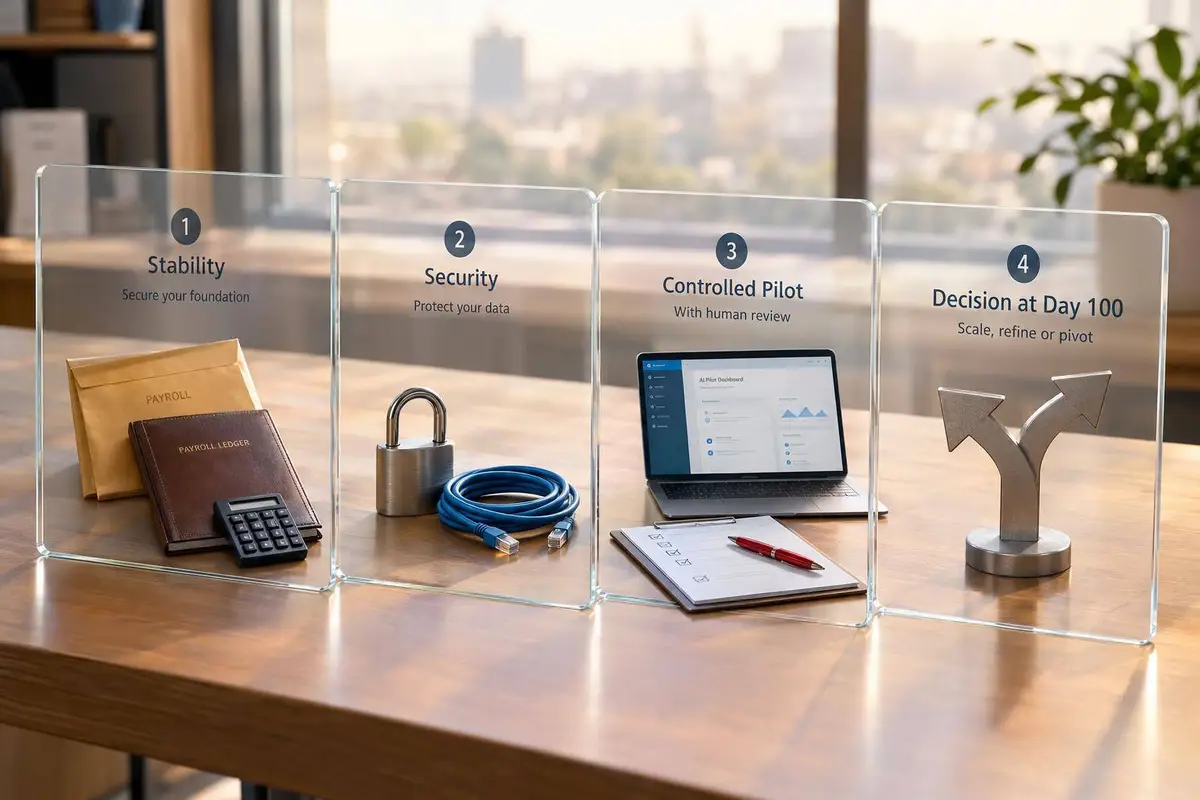
Protect payroll and cash, secure systems, run one controlled AI pilot with human review, and decide by day 100 whether to expand.
 Samson JagorasPrincipal & CEO/CIONovember 24, 2026
Sell your business for maximum value
Our sell-side advisors package, market, and negotiate your exit to qualified, verified buyers — confidentially.
I’d use the first 100 days to protect the business - not race to deploy AI. Keep payroll, customer work, and cash collection on track. Then test one small workflow with human review, a spending cap, and clear rules for stopping.
Here’s the plan I’d follow:
- Days 1–10: Secure buyer-controlled access, list critical systems, and test backups and manual fallbacks.
- Days 11–30: Map work, check source data, budget staff time, and review a rolling 13-week cash forecast.
- Days 31–60: Run one controlled pilot alongside the current process, without letting AI change production records. Measure accuracy, review time, and total cost.
- Days 61–100: Decide whether to stop, revise, keep testing, or expand. Require tested controls, enough staff time, and results from 50–100 representative transactions.
My rule: <u>time saved is not the same as cash saved</u>. I’d expand only when the numbers support it - and delay testing if customer commitments, staff workload, or cash flow need attention first. Day 100 is a decision point, not a launch deadline.

Post-Acquisition AI Rollout: First 100 Days
7 Steps to Automate Any Business With AI

sbb-itb-a3ef7c1
Days 1–10: Keep the Business Running and Secure Access
Confirm payroll, bank payment dates, invoice runs, fulfillment schedules, and support coverage with the employees responsible for each process. Identify the spreadsheets, manual approvals, and seller contacts they rely on. Document checklists and key contacts. Record walkthroughs only with permission, and never expose passwords or sensitive records.
Pause nonessential migrations and new AI pilots, but fix urgent security gaps immediately. Use what you learn to build the system register.
List Critical Systems and Transition Risks
Build the register with employees - not just diligence files. Include accounting, payroll, banking, invoicing, CRM, job management, email, cloud storage, scheduling, inventory, fulfillment, customer portals, phones, and payment processors.
Use the table as a collection guide, with one row for each actual system. In supporting notes, record the administrator, renewal date, license-transfer status, backup method, and manual fallback.
| System | Function | Owner | Data quality | Integration dependency | Continuity risk | Monthly cost | AI readiness |
|---|---|---|---|---|---|---|---|
| Accounting and payroll | Billing, wages, financial records | Finance lead | Source-record accuracy | Bank feeds and payroll links | Critical if payroll or payments stop | - | Completeness and permissions |
| CRM and customer support | Customer records and service | Sales or support lead | Duplicates and missing records | Email and portal links | Critical if support stops; high if slowed | - | Export rights and access |
| Job management and inventory | Scheduling and fulfillment | Operations lead | Job and stock accuracy | Scheduling and order links | Critical if fulfillment stops | - | Consistency and exportability |
| Email and cloud storage | Communication and shared files | Administrator and business owner | File ownership and completeness | Login and file-sharing dependencies | Rank by affected business functions | - | Permissions and data location |
Enter the actual monthly cost for each system.
Flag seller-controlled accounts, shared passwords, unsupported software, expiring domains, and integrations tied to former employees. AI readiness means usable, permissioned data eligible for a later pilot - not an advertised AI feature.
During these 10 days, log invoice cycle time, payroll errors, customer-response time, fulfillment delays, downtime, and staff hours. Record each measure’s source and calculation method so disruption from the acquisition doesn’t skew later comparisons. This register will serve as the baseline for workflow mapping in Days 11–30.
Test Recovery and Check Access Controls
Verify buyer-controlled admin access before removing seller access. This handoff must happen before any AI pilot. Confirm administrator login, billing control, recovery contacts, export rights, and working integrations.
Then rotate credentials and keys, replace personal recovery contacts, and remove accounts that are no longer needed. Enforce multifactor authentication, starting with email, banking, payroll, remote access, and administrator accounts. Review vendor access and keep only the privileges each vendor needs. Address exposed credentials or suspected compromise immediately - don’t wait for the routine handoff.
Set each critical system’s recovery time objective (maximum downtime) and recovery point objective (maximum data loss). Restore sample files in a nonproduction environment, recording elapsed time, missing data, and permission problems. Test one manual fallback with the employee responsible for it.
Examples: numbered manual invoices or printable pick lists.
Days 11–30: Map Workflows, Staff Time, and Costs
Once access is stable, map how work, staff time, and cash move through the business. Walk through the quote-to-cash workflow with the employees who enter orders, approve pricing, fulfill work, invoice customers, apply cash, and manage collections. For every step from quote or order to payment, record the system, owner, required fields, handoffs, approvals, exceptions, and duplicate entry.
Audit 20–30 recent transactions to find bottlenecks, measure labor use, and calculate exception-handling costs. Track normal-cycle and exception-cycle times separately. Credits, returns, partial shipments, disputed invoices, and missing purchase orders can otherwise hide delays. Consider AI only when the workflow is stable enough to measure.
Check Pilot Data Against Source Records
Match proposed pilot fields to contracts, invoices, the general ledger, bank records, and relevant quality-of-earnings schedules. Use consistent definitions for revenue and gross margin. Bank deposits alone do not establish revenue.
Before measuring pilot performance, log missing fields, duplicates, conflicting values, responsible owners, and resolution dates. Clearly Acquired can help connect diligence findings and financing assumptions to transition priorities, but management and lender review still govern accounting decisions.
Budget Staff Time and Protect Cash Flow
Reserve 2–4 hours a week for the process owner and 1–2 hours per participating frontline employee, adjusting for customer deadlines and month-end close. Budget time for setup, cleanup, training, review, and exceptions, then compare actual hours with that budget. Track continuity costs separately from process improvements, AI tests, and integrations.
Price licenses, usage, cleanup, consulting, integration, security, training, and administration in U.S. dollars. Use scoped quotes rather than list prices alone.
Check payment timing against a rolling 13-week cash forecast. Include collections based on customer payment behavior, plus payroll, taxes, vendors, working capital, and debt service. Test downside scenarios and delayed collections. Flag minimum-cash shortfalls and applicable lender restrictions, and replace forecasts with actuals weekly. Use the workflow with the most friction as the pilot candidate.
Choose What to Change, Test, or Defer
Keep stable systems unless a documented risk or business need calls for a change. Shortlist no more than two pilot candidates, each with usable source records, measurable work, limited downside, and a human reviewer.
Separate configuration within current software from custom integrations. Custom integrations add mapping, testing, security, and maintenance work. Give every proposed action an owner, spending cap, approval requirement, and stop condition.
| Decision | Appropriate work | Business risk | One-time cost | Recurring cost | Staff burden | Cash-flow impact |
|---|---|---|---|---|---|---|
| Change now | Low-risk, reversible cleanup: standardize required fields, remove redundant spreadsheets, configure existing features | Low if reversible | Low | Low | Low to moderate | Usually favorable after a short payback |
| Test first | Candidates for the single pilot: invoice extraction or duplicate detection with human review | Moderate; human review remains required | Low to moderate | Subscription or usage-based | Moderate during setup and review | Small near-term outflow; uncertain savings |
| Defer | Stable core-system replacement, custom integrations, or automated high-risk approvals | High during transition | Moderate to high | Moderate to high | High | Potentially large outflow and delayed payback |
Use this shortlist to select the single pilot for Days 31–60.
Days 31–60: Run One Controlled AI Pilot
Use the workflow selected in Days 11–30 and its recorded baseline for your first controlled test after stabilization. Assign one process owner to the 30-day test, with a spending cap in U.S. dollars, a transaction limit, and weekly reviews. Name a backup owner, and give the primary owner authority to pause testing. Keep the pilot paused until the Day 1–30 controls are closed.
Use Days 31–35 to confirm the workflow choice and set baselines, Days 36–42 to review controls and train staff, Days 43–52 to run AI alongside the current process, and Days 53–60 to evaluate results.
Score Use Cases Before Choosing a Tool
Score your shortlist on a 1–5 scale before reviewing tools. Higher scores are better for value, data readiness, staff capacity, and payback potential. Lower scores are better for setup effort, risk, and integration cost.
Favor use cases with value and data readiness scores of at least 3, risk no higher than 2, and minimal integration. The scorecard below illustrates the tradeoffs; use your selected workflow to determine the actual scores. Choose the highest-scoring option that still requires human review and minimal integration.
| Use case | Value | Setup effort | Data readiness | Staff capacity | Risk | Integration cost | Payback potential | Recommendation |
|---|---|---|---|---|---|---|---|---|
| Internal meeting summaries | 4/5 | 1/5 | 4/5 | 4/5 | 1/5 | 1/5 | 3/5 | Pilot |
| Inquiry classification | 4/5 | 2/5 | 3/5 | 3/5 | 2/5 | 2/5 | 4/5 | Pilot with human review |
| Invoice data extraction | 4/5 | 3/5 | 3/5 | 2/5 | 4/5 | 4/5 | 3/5 | Defer |
Define Pilot Steps and Data Controls
Once you select the use case, finalize the review path and fallback before launch. Document each step:
Trigger → permitted inputs → AI task → human review → approved output → system of record → escalation path.
Run AI alongside the current process, but do not let it write to production records. Keep manual procedures and escalation contacts available. Exclude autonomous financial decisions, employment decisions, legal conclusions, unreviewed customer commitments, and accounting-record changes.
Before submitting sensitive data, check privacy obligations, customer contracts, vendor retention and deletion policies, model-training terms, and access permissions. Submit only the information needed, and restrict production write access during the test. Train reviewers on prohibited inputs, verification, incident reporting, and manual fallback.
Set launch thresholds before testing: 95% classification accuracy, under two minutes of review per item, no critical privacy incidents, and 20% lower handling time. Pause for disclosure, material customer errors, repeated incorrect outputs, fallback failure, or spending or transaction cap overruns.
Measure Accuracy, Review Time, and Net Returns
Compare pilot results with the baseline from Days 11–30. Check both routine cases and exceptions against human-verified baseline results. Track accuracy, reviewer time, rework, exceptions, adoption, customer impact, failures, and near misses. Separate results by case type so averages don't hide serious errors.
Calculate net benefit after setup, subscriptions, integration, training, review, rework, and parallel-running costs. Report hours released separately from cash saved: faster work doesn't automatically reduce payroll. Record one-time and recurring costs separately, and label projected savings as projections.
Get a Quality of Earnings analysis you can trust
Days 61–100: Decide Whether to Expand
Use the pilot baseline from Days 31–60 and workflow records from Days 11–30 to decide whether expansion is justified.
Use a Readiness Matrix to Make the Decision
Day 100 is the decision deadline. Rate each area green, yellow, or red, attach the supporting record, and name its owner. Time savings cannot outweigh a security gap or an overloaded team.
Base the decision on control, capacity, and cash - not enthusiasm for the pilot alone.
| Area | Stop | Redesign | Continue testing | Expand | Required proof / owner |
|---|---|---|---|---|---|
| Business stability | Critical disruption | Fixable workflow friction | Stable over a limited period | Service, quality, and revenue targets hold | Operating results / operator or general manager |
| Data | Inputs used without permission or unusable inputs | Correctable source gaps | Coverage too narrow | Current, permitted, traceable inputs | Source reconciliation / finance or data owner |
| People | Workload the team cannot sustain | Training or review needs changes | Capacity remains uncertain | Trained staff can manage exceptions | Time logs and training records / department manager |
| Controls | Unacceptable exposure | Fixable control gaps | Controls need more testing | Access restrictions, logging, incident response, and rollback were tested | Test records / IT or security lead |
| Finances | Immaterial benefit or unaffordable cost | Cost structure needs changes | Returns remain uncertain | Conservative returns fit the cash plan | Full-cost forecast / CFO, controller, or buyer |
| Performance | Unacceptable errors | Correctable output problems | Sample too small or uneven | Agreed thresholds met on representative work | Reviewed results / workflow owner |
| Integration | Threatens core records | Permissions or interfaces need changes | Failure behavior unproven | Tool does not compromise the system of record | Interface and recovery tests / IT or systems owner |
| Governance | No accountable owner | Responsibilities incomplete | Oversight needs validation | Owners and review rules documented | SOP and decision log / executive sponsor |
Approve expansion only with no red ratings, written responses to every yellow, and signatures from the executive sponsor and workflow owner. Critical controls and staff capacity must be ready - not just promised.
Require a representative sample of 50–100 transactions; rare errors may need more testing. Before approving spending, include maintenance, usage, cancellation, and contingency costs. Defer approval if returns depend on optimistic assumptions.
Assign Owners and Set Monitoring Rules
Before rollout, update the SOP and assign workflow, vendor, and data owners, plus an executive sponsor. Sample outputs weekly for the first 60 days of expansion, then monthly after stabilization.
Keep a change log for prompts, models, vendors, data, and integrations. Reassess performance after material changes.
Give the workflow owner authority to pause use and restore the manual process. Before enabling record changes or downstream actions, require separate approval from the executive and systems owner. Test rollback before enabling write access.
Report Day-100 Results and Set 12-Month Priorities
Prepare a short report covering continuity, security, review burden, one-time and recurring spending, verified cash or capacity gains, open risks, control gaps, rollback status, and the pilot decision. Include the approved budget, accountable owner, and next review date.
Set three to five priorities for the next 12 months: stabilize the pilot, fix data or reporting gaps, train managers, formalize governance, and review one adjacent low-risk workflow - but only after oversight is reliable.
Give each priority an owner, budget range, dependency, target quarter, success measure, and stop condition. Expand only when the pilot shows the team can absorb more work without straining cash flow or controls. Defer additional pilots when review queues grow, controls remain incomplete, or post-close cash flow falls below plan.
Conclusion: Stabilize First, Test Small, Expand When Ready
Protect payroll, customer service, and cash collection first. Then test a single workflow under controlled conditions. Expand only when the results justify the full cost and your business can safely handle the change.
FAQs
What if my business lacks enough transactions to validate an AI pilot?
Expand only after checking model outputs against actual production data. Scale only use cases that have been proven and can deliver repeatable results. Follow this sequence for the first 100 days:
- Days 1–30: Secure access, verify backups, and check operational technology segmentation.
- Days 31–60: Set operational baselines.
- Days 45–75: Validate model outputs.
- Days 75–100: Expand.
Build the plan around employee capacity and 13-week cash flow forecasts. Include retention payments and integration costs in your sources-and-uses schedule.
How can I turn AI time savings into measurable cash benefits?
Set a baseline for labor hours, uptime, and yield. Then check AI outputs against actual production results. Scale only the uses that deliver repeatable gains in finances or production performance - not time savings alone.
Plan the first 100 days around four overlapping phases: secure system access and recovery in days 1–30, set baselines in days 31–60, validate results in days 45–75, and expand selected, proven uses in days 75–100.
How should I handle employee concerns about AI after an acquisition?
Start with employee capacity: identify who holds key knowledge and train backups early. Use a 100-day roadmap to secure access, observe how the business runs, test AI performance, and expand only where the results support it.
Address critical IT risks and backup needs first. Establish baselines for how the business runs before making changes, and scale only AI uses that deliver repeatable financial gains. Include integration costs in your 13-week cash forecast to protect liquidity and keep the business running.
Related Reading
Sell with advisors who maximize your outcome
From valuation and positioning to closing the deal, we run a competitive process to get you the best terms.
About the author
Principal & CEO/CIO
Samson Jagoras has 15+ years across finance, real estate, and business acquisitions. He began his career as a Futures & Commodities broker and later served as Chief Strategy Officer of an INC 500 marketing and technology firm, helping scale revenue from $1M to over $100M. Today he buys, builds, and advises a portfolio of companies with a focus on M&A, capital allocation, and operational strategy.